
Automated performance testing for ANY business process
Short time frames, multi-tiered applications, and lack of open APIs are no longer a barrier to performance testing your applications.
Trusted by 200+ enterprises worldwide





Front-end robotic technology takes performance testing to a new level
With bots accessing your applications en masse from the GUI on their individual desktops, you get a true view of your app's performance.
Build custom workflows easily
Go beyond standard 'Log-In time' testing. Create complicated multi-application processes that mirror exactly how your users interact with your systems.
Install nothing on your servers
Robotic automation avoids server installations on application servers or VDI (Citrix, AVD). Bots access your applications via the front-end, just like real users.
Test across any application, any framework
Test processes involving multiple applications through various access points — without requiring APIs, plugins, or protocol-level scripting.
Automai Loader is the only front-end driven performance load testing tool on the market.
Record, click, script done
Performance testing should not require coding. Build scenarios in minutes using plain-English actions that anyone can understand.
Click through your application — Automai records every interaction
Code-free scripts with human-readable actions
Play back, observe, and edit with ease
Add conditional logic for complex workflows
The most realistic load test on the market
Unlike protocol-level tools that simulate HTTP requests, Automai uses robotic bots that interact with your applications exactly as real users do — through the GUI.
Each bot runs on its own desktop, mimicking a real user session
Measure actual end-user response times, not just server metrics
Test thick clients, thin clients, and web apps with the same tool
Capture screenshots and video evidence for every bot session
User-friendly test scenarios
Every action in your test scenario is displayed as a plain-English command. No code, no confusion — just clear, editable steps.
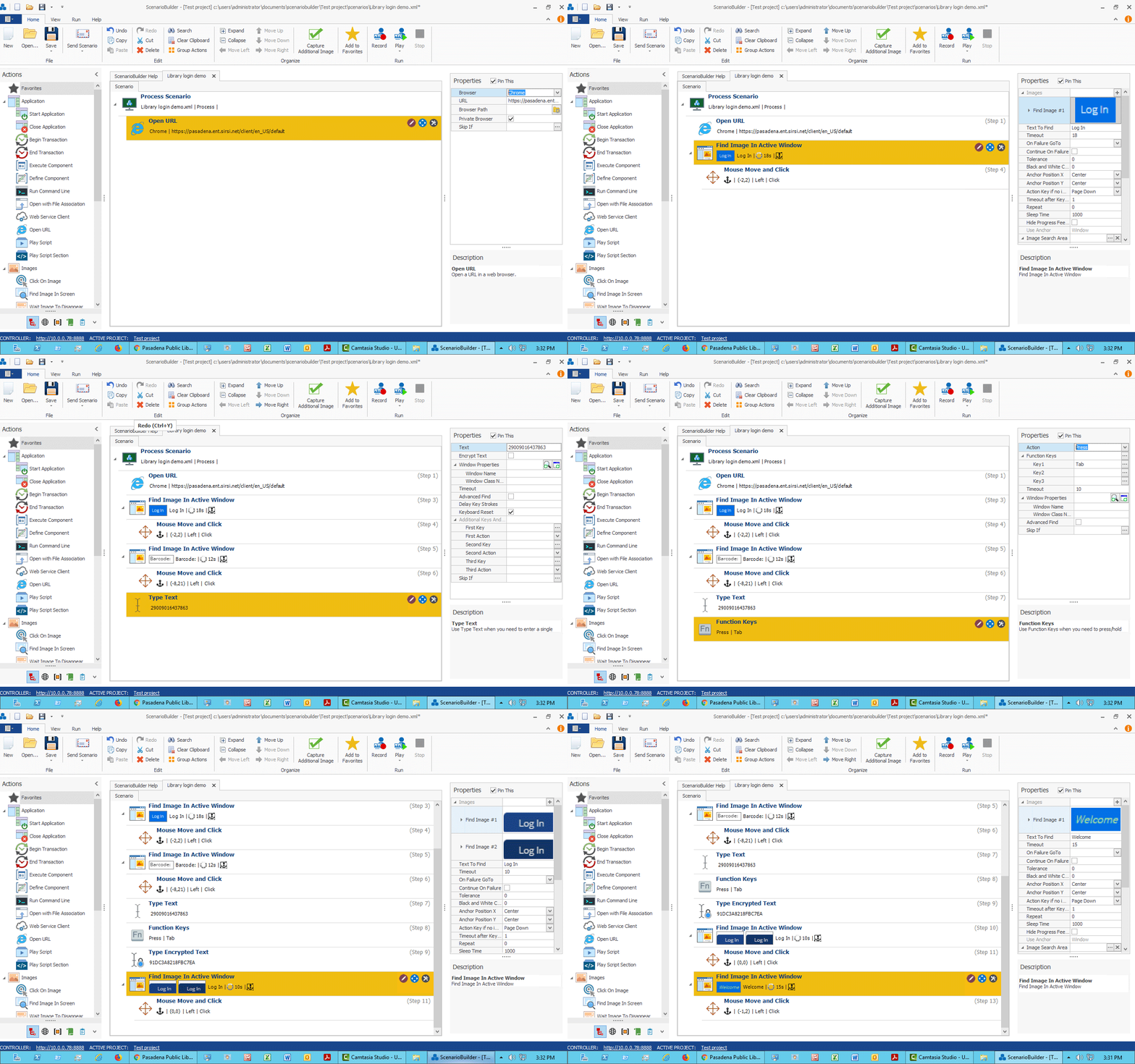
Plain-English actions
Every step reads like a sentence — click, type, wait, verify. No code to decipher.
Drag-and-drop editing
Reorder steps, add conditions, and insert checkpoints visually.
Reusable modules
Build once, reuse across scenarios. Share common login flows across tests.
Easy maintenance
When your application changes, your test scripts should not break. Automai's intelligent action system adapts to minor UI changes automatically.
Smart object recognition adjusts to UI changes
Update one module, and all referencing scenarios update instantly
Visual diff tool highlights exactly what changed
No regression headaches — scripts stay stable across updates

How does Automai Loader work?
From recording to reporting — four simple steps to performance test any application at scale.
Record your scenario
Use ScenarioBuilder to walk through your business process. Every click, keystroke, and wait is captured as a plain-English action. No scripting — just use your application normally.
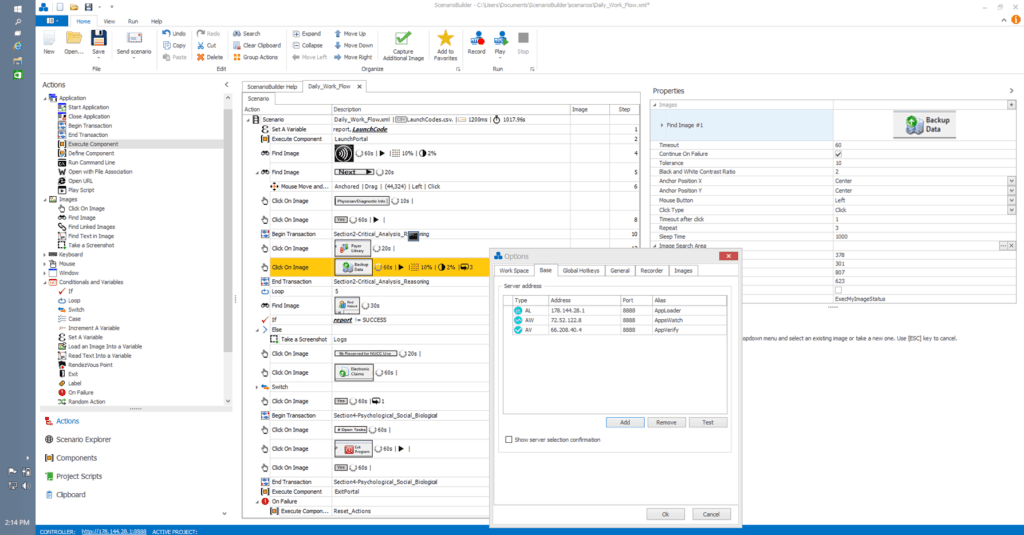
ScenarioBuilder
Director
Test orchestration
BotManager
Bot provisioning
rLoaders
Applications under test




ScenarioBuilder
Director
Test orchestration
BotManager
rLoaders
Applications under test
Automai Loader architecture — bots access applications from individual desktops, just like real users.
Four powerful components, one platform
Automai Loader is built from four tightly integrated components that work together seamlessly.
ScenarioBuilder
The visual recorder and editor. Walk through your application, and ScenarioBuilder captures every interaction as a plain-English action. Edit, reorder, and add logic — no coding required.
System requirements
Automai Loader runs on standard Windows infrastructure. No special hardware or exotic configurations needed.
Bot desktops
- Windows 10/11 or Windows Server 2016+
- 2 vCPUs, 4 GB RAM per bot
- Network access to target applications
Director server
- Windows Server 2016 or later
- 4 vCPUs, 8 GB RAM minimum
- SQL Server Express (included) or full SQL Server
Target applications
- No installation required on application servers
- No agents, plugins, or API access needed
- Works with Citrix, AVD, VMware, RDP, web, and desktop apps
Network
- Standard HTTPS connectivity
- No special firewall rules required
- Works across VPNs and segmented networks
Part of the Automai platform
Loader integrates seamlessly with the full Automai suite. Use the same scenarios across testing, monitoring, and automation.
Loader
Performance testing at scale
You are hereTester
Automated functional testing
Learn moreMonitor
24/7 application monitoring
Learn moreWorker
Robotic process automation
Learn moreAutomai Loader FAQ
Common questions about performance and load testing.
It's the end of the page
And the beginning of your automation journey
Start with a free proof of concept. Install nothing on your servers. See results in days, not months.